Order book historical data: what it is, where it comes from, how to replay it
What order book historical data contains, the two ways to get a file you can replay (download one under your own account, or record one yourself), and what the licence on that file means in plain words.
What you get: your own recorded limit order book, rebuilt level by level and replayed step by step in the Matchstick Replay app. The file stays on your machine; Matchstick’s servers never see it.
What “order book historical data” is
An order book is the list of buy and sell orders waiting at each price. Historical order book data is a recording of how that list changed over time, so you can look at the book as it was at an earlier moment.
Most files of this kind are Level 2, also called market by price: the total size waiting at each price, not each individual order. They hold a starting picture of the book (a snapshot), then one row for every change after it. Replay rebuilds the book at any point by starting from the snapshot and applying the changes in order. For how this differs from order-by-order data, see Market by order vs market by price.
Two ways to get a file you can replay
- Download one under your own account. Some data services sell or give out Level 2
history files. The file this guide imports is a Tardis.dev
incremental_book_L2CSV, one exchange and one symbol per file. The steps start in section 1 below. - Record one yourself. If you do not have a data account, a short script can record a few minutes of a public exchange feed on your own computer: Record an order book yourself.
Matchstick does not provide, sell or host market data. In both cases the file comes from you.
What stays on your computer
The file is read in your browser and the session is stored in your browser. The app’s automated test imports a file, steps through it and removes it, and checks that the browser sends nothing to any other site. Usage counts are off unless you turn them on.
Licence, in plain words
A data file comes with the terms of whoever supplied it. Those terms can say you may use it only yourself, and may not post it, show it, or share screenshots or video of it. Terms differ by supplier, so read yours before you share anything made from the file. Matchstick makes no claim about what any supplier’s terms allow. If you want something to show other people, use the labelled synthetic sample sessions in the app.
What Replay does not read yet
Replay does not read market-by-order (Level 3) data, and it does not read your broker’s order or fill history. It reads recordings of the market.
1. Get the file from Tardis
- You need a Tardis.dev account and an API key, as the examples below use. Check Tardis’s own documentation for what each download requires.
- Install a client:
pip install tardis-dev(Python 3.9+) ornpm install tardis-dev(Node 24+) (same source). - Download one
incremental_book_L2file for one exchange and one symbol. Python example:
(https://docs.tardis.dev/python-client/quickstart.md, accessed 2026-09-23)from tardis_dev import download_datasets download_datasets( exchange="binance", data_types=["incremental_book_L2"], symbols=["BTCUSDT"], from_date="2026-09-01", to_date="2026-09-02", api_key="YOUR_KEY", ) - Or fetch it directly:
curl -H "Authorization: Bearer YOUR_KEY" https://datasets.tardis.dev/v1/binance/incremental_book_L2/2026/09/01/BTCUSDT.csv.gz -o BTCUSDT.csv.gz(https://docs.tardis.dev/downloadable-csv-files/api.md, accessed 2026-09-23). - The file lands named like
binance_incremental_book_L2_2026-09-01_BTCUSDT.csv.gz(https://docs.tardis.dev/node-client/quickstart.md, accessed 2026-09-23).
2. Check the file before you import
- One file always covers one exchange and one symbol. Tardis’s columns are
exchange, symbol, timestamp, local_timestamp, is_snapshot, side, price, amount(https://docs.tardis.dev/downloadable-csv-files/data-types.md, accessed 2026-09-23). Matchstick checks for that exact header and rejects a file that mixes symbols or exchanges, or that isn’tincremental_book_L2. - Leave the file as
.csv.gz, or decompress it first — Matchstick accepts either. - The clock that matters is
local_timestamp. It’s the time Tardis’s own capture machine received the message, in microseconds. The other column,timestamp, is the exchange’s clock, and Tardis documents that it can jump backwards (https://docs.tardis.dev/faq/order-books.md, accessed 2026-09-23). Matchstick orders everything bylocal_timestampand keepstimestamponly as extra evidence.
3. Import it
- Open the Matchstick Replay app. The Replay app is invite-only. Request access at app.matchstick.trading; the public demo at replay.matchstick.trading needs no account. Request access.
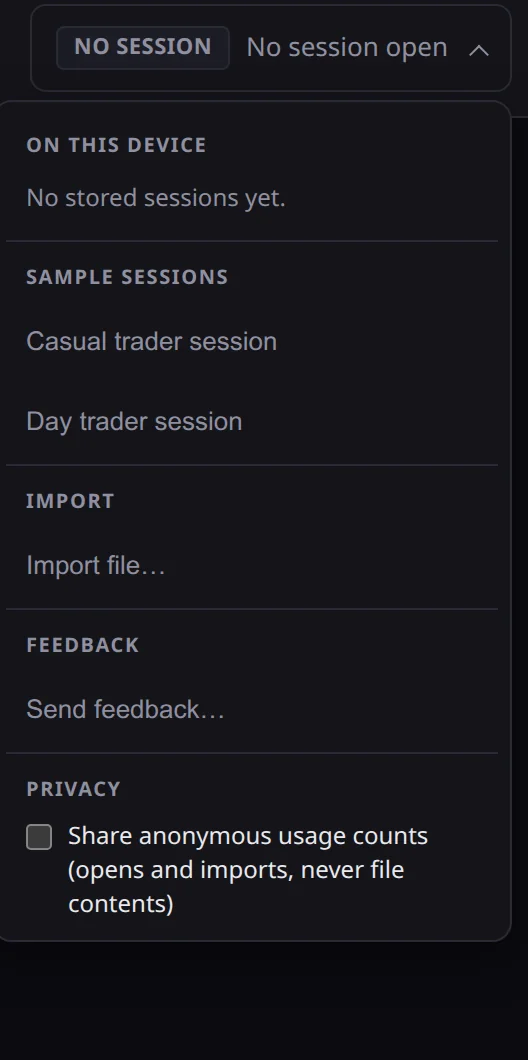
- Open the session menu at the top of the window — it shows a badge reading “No session” until you load one.
- Choose Import file… and pick your
.csvor.csv.gz.
4. What you see after import
- The order-book workspace opens in place of “No session open.” Step forward and back one event at a time; each step shows the sequence number, side, price, and new size.
- Rows before the file’s first snapshot are skipped, per Tardis’s own documented behavior. The app does not currently show how many were skipped.
- If Tardis recorded a mid-file reset (the feed reconnected), you’ll see the book briefly empty and refill. That’s Matchstick’s converter synthesizing removes so every state stays independently verifiable.
5. Limits and errors you might hit
| You see | It means | Do this |
|---|---|---|
UNSUPPORTED_FORMAT | Header doesn’t match, or wrong data type | Confirm you downloaded incremental_book_L2, not trades or a snapshot type |
INVALID_EVENT | A row has wrong columns, mixed symbols/exchanges, a bad side/flag, a non-integer timestamp, or a price/amount that isn’t a plain decimal (e.g. exponent notation) or is negative | The file may be corrupted or hand-edited; re-download a clean copy |
OUT_OF_ORDER_TIMESTAMP | A row’s local_timestamp went backwards | Matchstick never reorders rows; re-download rather than editing the file |
LEGACY_IMPORT_FAILED | No snapshot found, or nothing after the snapshot | Download a longer time window |
FILE_TOO_LARGE / LIMIT_EXCEEDED | File or decompressed size exceeds the app’s budget (512 MiB) | Download a shorter window or fewer symbols |
| Decompression error | Your browser lacks DecompressionStream | Decompress the .csv.gz yourself and import the .csv |
Don’t do this
- Don’t post or screenshot a replay built from your real Tardis file. Tardis’s terms restrict use to internal/personal use and don’t carve out showing raw or reconstructed market data to anyone else; Coinbase-sourced data adds an explicit display ban (https://docs.tardis.dev/legal/terms-of-service, accessed 2026-09-23). Check your own Tardis agreement before sharing anything.
- Matchstick makes no performance, regulatory, or licensing-permission claim about this data or your use of it. When in doubt, check your data vendor’s terms.